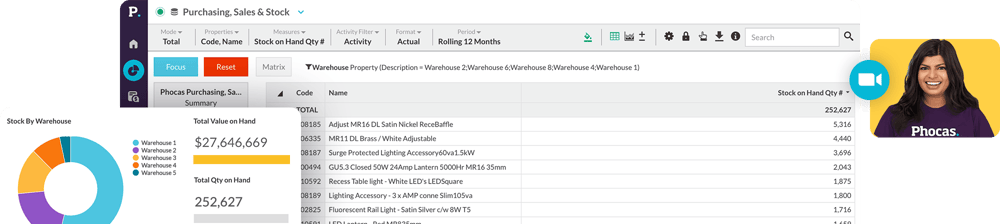
View performance instantly, close faster

See how Phocas streamlines financial reporting - 1:17s
Automate month-end close across every entity
- Every division, branch and entity gets its own statement, refreshed automatically; nobody waits on finance to pull numbers together
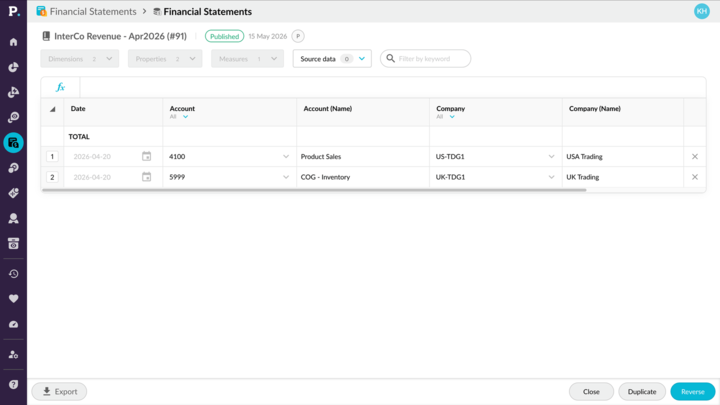
- Post manual adjustments and intercompany eliminations with journals, right inside the same screen you use to review the numbers.
- Give each branch or department self-serve access to reports that matter to them, so finance stops fielding ad-hoc requests.
Empower your finance team
"This is a very user-friendly product. We can build it and compare numbers month over month, or year over year. And it's very helpful to build in some of those gross margin and some of those analyticals into the financial package that we use at month end as well as every day."
Amanda Ware
Director of Accounting and HR at Stokes Electric Company

One view across every
entity, territory and currency
Built for structural complexity, whether that’s a distributor’s branches and warehouses, a manufacturers production sites or a retailer’s stores.
- Generate a consolidated P&L, balance sheet and cashflow (direct or indirect) then switch to any single subsidiary, territory or branch
- Toggle between local and reporting currency, with FX gains and losses on foreign subsidiaries calculated for you
- Handle inter-company journals with the built-in journals feature; great for teams managing adjustments across multiple ERPs in spreadsheets















Deeper insights into business performance
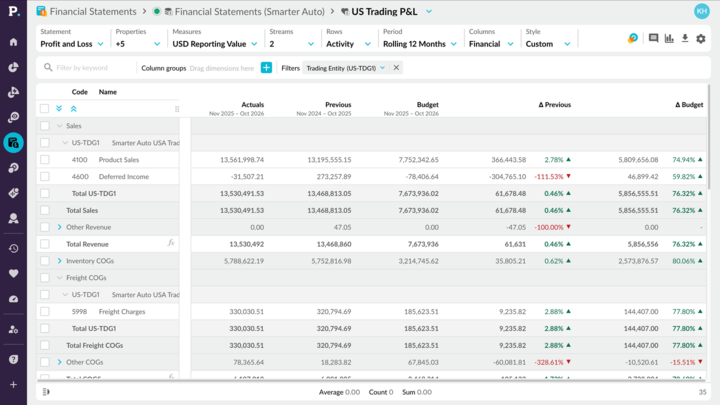
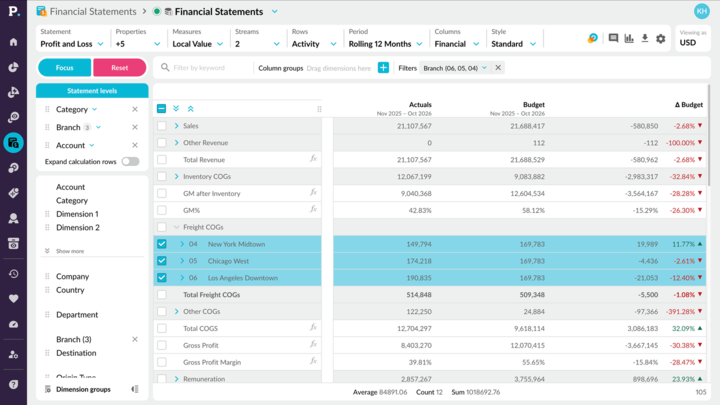
- Compare actuals to budget side by side and see both the value and percentage gap, instantly
- Break down any line by any dimension you track, like freight expense by warehouse or COGS by product line
- Search any statement by keyword or value, jump straight to the line you need in a large chart of accounts
- Pair operational and financial data to build the ratios your business runs on, like EBITDA, revenue per customer, inventory turnover and average daily sales

“Before, management would ask a question at a meeting, and I wouldn’t have an answer so I would have to wait a month for the next meeting to provide them with an answer. Today, I can answer all their questions on the fly because we have Phocas. Now we can use data to plan possible outcomes, not just report after the fact.”
Klipboard + Phocas customer
Spend your time analyzing, not assembling
- Drill into underlaying transactions, including the journal behind an adjustment
- Explain a variance at its root cause without exporting to investigate as the answer is already in the statement
- Build and restyle statements yourself with point and click formulas and row-level styling
- Every special function, including FX, is right there in the interface. Export just the values you need, even on the biggest statements
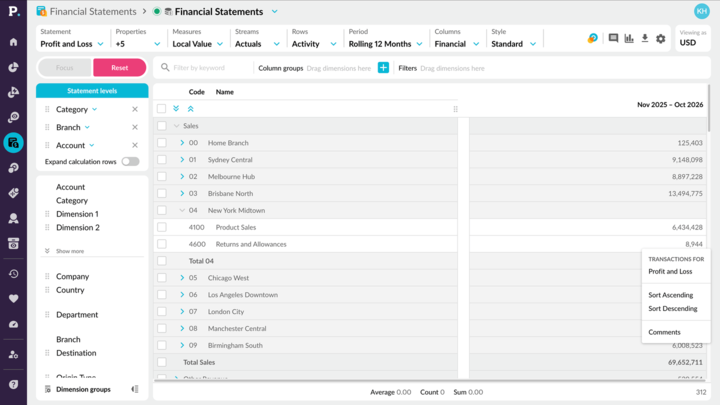
Self-serve, right to the transaction
"The branch managers and the cost center owners being able to delve into the transactions has been the biggest thing for us. Being on Klipboard, we create thousands and thousands of postings every month. Some of our accounts have millions of postings built up over the course of the last eighteen months. So them being able to go in, filter on that rather than us sending them a spreadsheet with thousands of lines on it."
Dan Mellor
Systems Accountant at The BSS group

Phocas can manage a lot of data, so in seconds, I have up-to-date financial reports.
Epicor + Phocas customer
Start from a statement library,
not a blank page
Pick a pre-built template so every statement follows a proven structure, built the way finance actually works.
- Choose from pre-built income statement, balance sheet and cashflow templates with structure, groups and calculations already configured
- Industry-specific P&L templates for distribution and manufacturing reflect how your sector reports; COGS, gross margin, overheads
-
First time setting up a statement type, like a direct or indirect cashflow? Start from a solid structure instead of building one from scratch
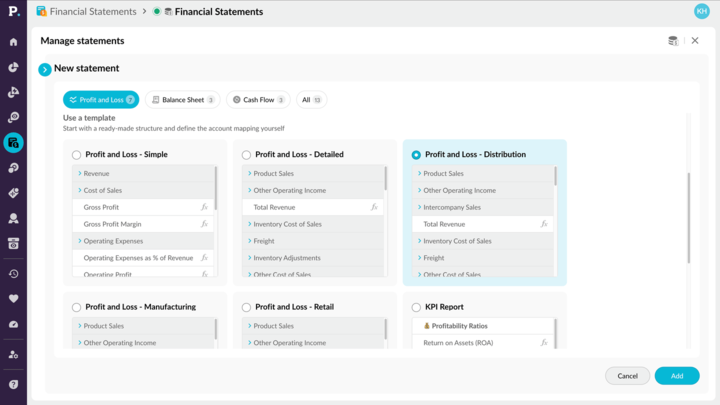
AI account mapping
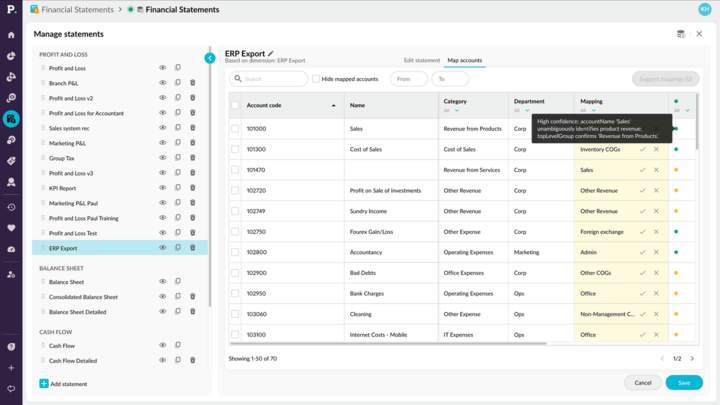
AI does the heavy lifting on account mapping. You stay in control
- AI analyzes your chart of accounts and suggests where each account belongs in your statement, turning hours of manual mapping into minutes of review
- Every suggestion comes with a confidence rating, so you can accept the obvious ones quickly and focus attention where it's needed
- Nothing is saved until you approve it. Accept, adjust or map manually, and edit any mapping later
-
When you add new accounts to your chart of account, run AI mapping again to slot them into your existing statements
“Phocas can tell you anything that you want to know about your company, from sales to inventory, by SKU or by product, by customer or by transaction. Using data to make decisions is the expectation now, and we expect people to use data to help with their roles. Those that are using Phocas every day are constantly finding ways to improve their areas of responsibility.”
Infor + Phocas customer
Watch Financial Statements in action
-

Automate month-end
Speed up month-end close by 50%. See how Phocas automatically structures your data into up-to-date financial statements, saving you hours of number-crunching. -

Customize statements
Phocas makes customization a breeze. Learn how users can easily tailor statement views to suit specific needs without the hassle of spreadsheets. -

Track performance
With Phocas, dynamic, interactive statements and dashboards allow you to track performance at any time and to freely investigate your financials. -

Financial ratios
Phocas simplifies the process of creating and tracking essential financial ratios. In this video, learn how to build custom ratios, like revenue per customer, to keep your business on top of its key performance metrics. -

Spot opportunities & risks
With Phocas, you can easily check for errors, spot potential risks and uncover the root causes very quickly by drilling down to the transactional data. -

Management reporting
Phocas makes it easy to create tailored, up-to-date management reports and board-level dashboards. Customize views for each department, and share insights effortlessly, all from one platform. -

Visual storytelling
See how Phocas brings performance metrics to life with dashboards and charts, making it easier for non-financial team members to engage with their numbers. -

Financial consolidation
Phocas makes it easy to report across multiple currencies and subsidiaries in your Profit and Loss, balance sheet and cashflow statements.
Phocas supports cross-functional departments. It’s cloud-based and can easily compare multiple groups of data.
Infor + Phocas customer
One platform, connected end to end
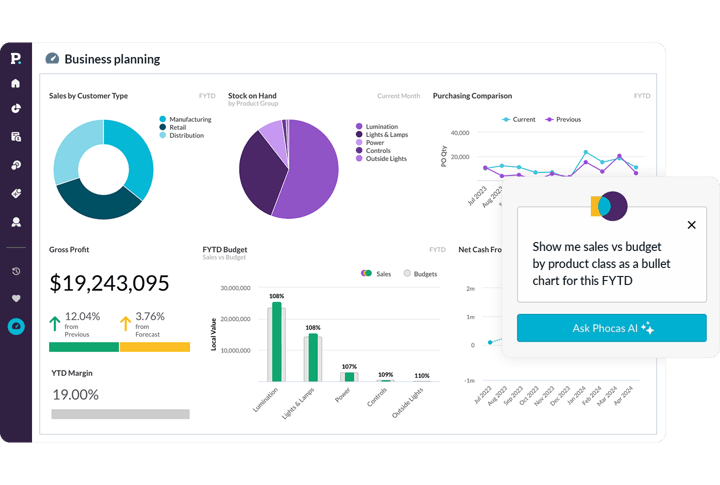
Analytics
Fast access to sales, inventory and margin data across every branch and SKU. Spot trends, find gaps, act quickly,
- Self serve design means anyone can drill into the numbers, right down to transaction level.
- Custom dashboards and reports with shareable alerts
- Spot customers who are less profitable than they first appear
-
Compare margins across product lines, from timber and panels to roofing, insulation and steel
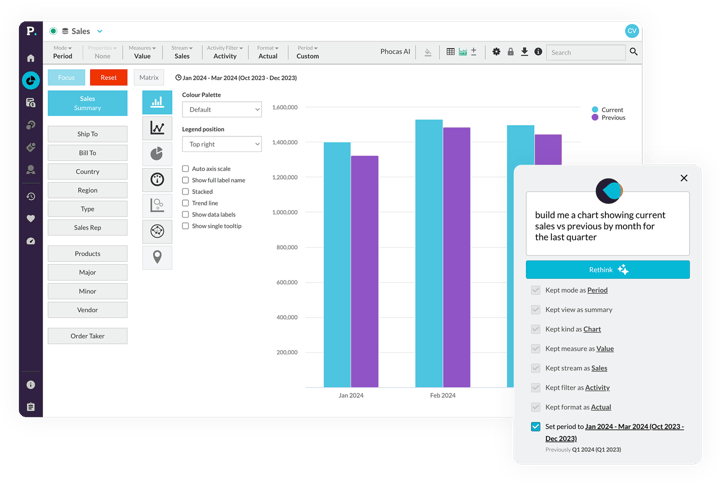
Phocas AI
AI-powered insights across sales, finance and operations, so your team spends less time chasing data and more time making decisions.
- Ask questions in plain language, like "which customers declined last quarter" or "what's our best-selling product line across every branch"
- No waiting on IT or data analysts, get answers and insights on the spot
- Your data stays within the Phocas environment, nothing shared externally
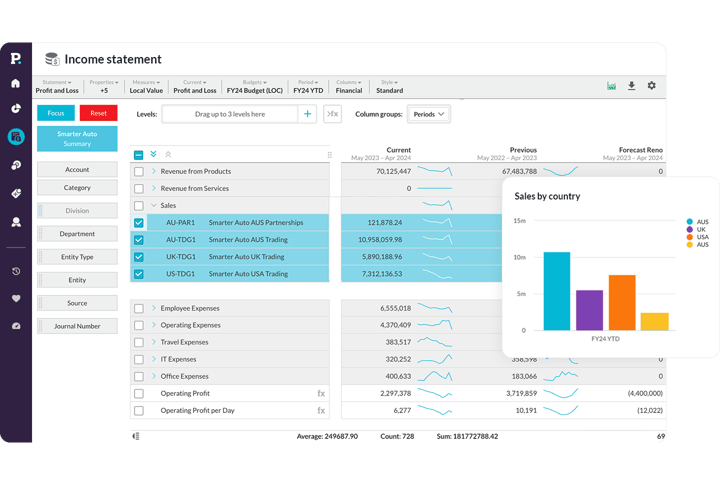
Financial Statements
Turn ERP numbers into dynamic profit and loss, balance sheet and cash flow statements by branch. Drill into transaction detail to find and solve problems.
- Fast, automated monthly reporting and consolidations
- Live actuals tracked alongside budget
-
Drill down to transaction level to pinpoint issues
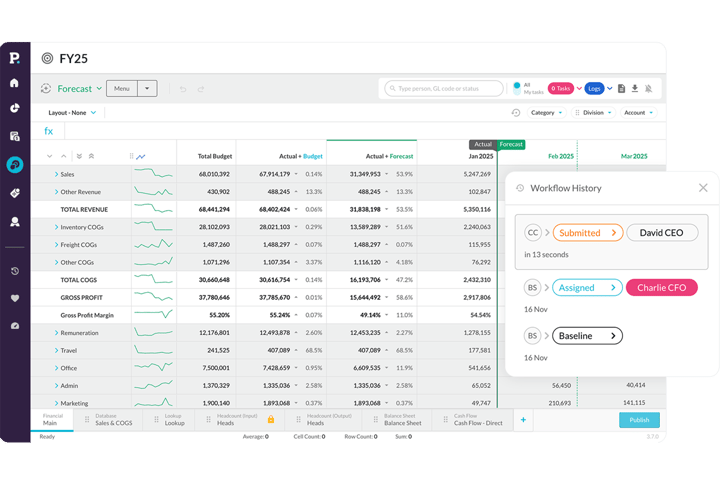
Budgets & Forecasts
A collaborative, flexible budgeting tool. Aligns financial budgets, sales forecasts, demand planning and headcount, and stays easy to use for everyone.
- Familiar excel-like interface
- Adjust for supplier price changes, seasonal demand and sales trends, including volatile materials costs across lumber and steel
- Live actuals enable ongoing reforecasting
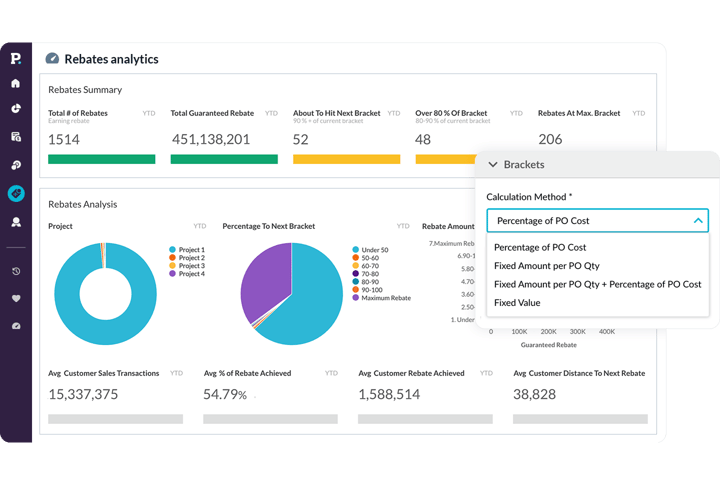
Rebates
Stay ahead of multiple supplier and buying group rebate programs with a tool that delivers accurate, efficient rebates and helps you negotiate with confidence.
- Live data to improve rebate performance
- Automated calculations reduce errors
- Near-miss analysis unlocks revenue
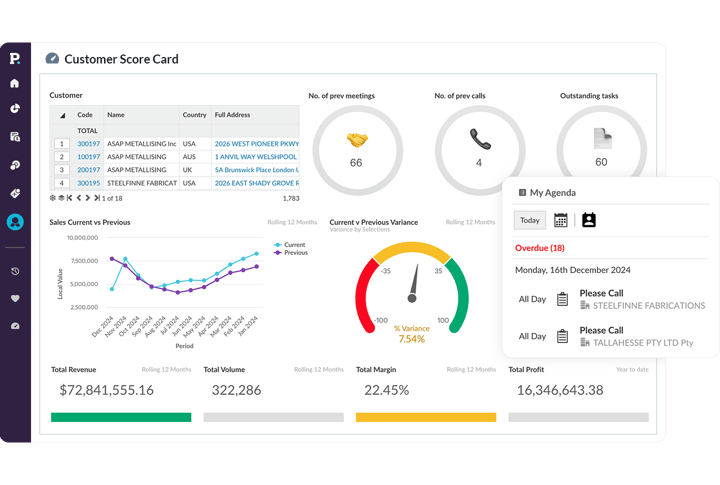
CRM
Connect sales insights to sales activities. See trade customer data and live sales information in one place, and track opportunities and risks as they happen.
- AI Voice turns a 45-second recap into structured notes and follow-up tasks
- Drag-and-drop pipeline updates in the flow of selling
-
Optimized for mobile, built for reps in the field
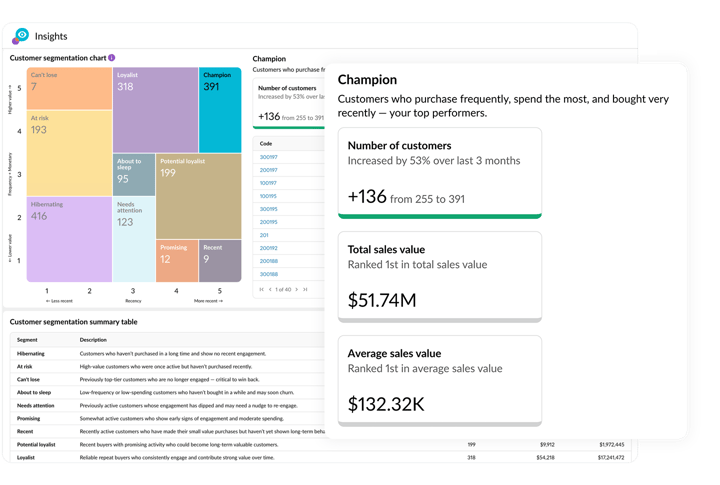
Sales Insights
Focus on what and who really drives growth. Spot early signs of contractor accounts going quiet, and re-engage lapsed accounts before it's too late.
- Segment customers by buying behavior using recency, frequency, monetary value (RFM) analysis
- Automated insights and summaries
-
Built for busy sales teams to act fast
See how Phocas stacks up
Anaplan vs Phocas


Board vs Phocas

Prophix vs Phocas
Vena vs Phocas

Jedox vs Phocas
Planful vs Phocas

Workday vs Phocas

OneStream vs Phocas

Pigment vs Phocas









Understand the past, operate better today, and plan well for the future