Phocas has upgraded the system we use to manage customer support. We’ve moved from Jira to Pylon, a support platform designed for B2B software companies like Phocas and the customers we work with.
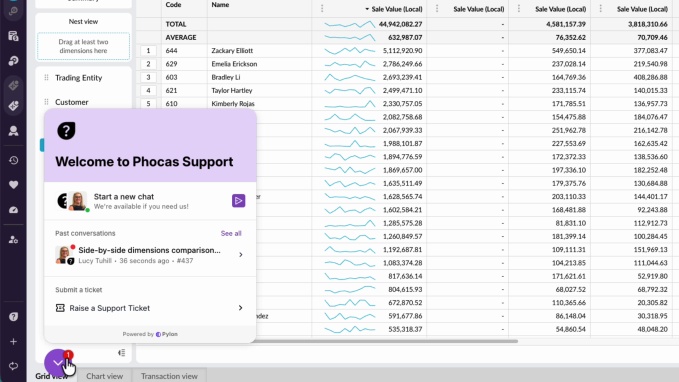
This change is part of our ongoing effort to improve how customers get help. All the familiar ways of contacting customer support are still available plus we have added more channels for your convenience. Phocas customers can now contact support in four ways including via an in- platform chat and dedicated portal.
Having customer conversations in one place keeps account context and promotes internal collaboration so teams can respond faster to customers’ requests. As Phocas continues to grow, it’s important that our support experience grows with it.
Alix Huntsman, Vice President of Customer Success at Phocas is driving the positive change for customers. “The goal is to help customers get support when and where they need it, which is often while they’re already working in Phocas. We want support to be intuitive and immediate,” says Alix.
How the updated support experience works
Getting help from the Phocas customer team is now more straightforward, because support is available directly inside the platform.
You might be working in Phocas Analytics, Financial Statements, Budgets and Forecasts, CRM or Rebates and now you can contact support without leaving what you’re doing.
There are four ways to get help within the platform.
1. Chat
Chat is ideal for quick questions, guidance or troubleshooting. It’s a conversational way to get help but it still creates a support ticket behind the scenes.
All chat history and tickets are kept together in the portal regardless of how the request started.
2. In-platform ticket creation
Users can log a support ticket from the Help and Support menu, instead of being redirected to a portal.
3. Email
You can still contact support by email using the same address support@phocassoftware.com
Emails are also handled through Pylon, from your perspective, nothing changes. You send an email and our support team responds as usual.
4. Support portal
You can also log support requests and manage your cases through the support portal https://portal.usepylon.com/phocas/login
Log in using the same email address you use for Phocas. We recommend bookmarking the portal for easy access in the future.
In the portal, you can see your support cases in one place, check updates and respond to your support team. The portal tracks all your requests regardless of whether they started via chat, email or the portal.
No matter which option you choose, your request will continue to be handled by your global Phocas support team.
What to expect during the transition
The new system is live in February 2026. There is a short transition period, but support will continue as usual throughout. Any open tickets at the time of launch will be migrated into Pylon so conversations and history are preserved, and work can continue with minimal interruption.
Customers with open cases will receive direct communication to keep them informed during the transition.
If you have bookmarked the old Jira-based support portal and try to use it after the change, you’ll get a message to remind you to use Pylon. It is a good idea to bookmark the new support portal. Submission forms will be removed from the old portal to avoid confusion.
What’s next
For now, the focus is on making sure the basics work well. We want contacting support through the platform, email or the portal to be consistent and easy.
Over time, Pylon will give us better visibility into the types of questions and issues customers raise. That insight helps us make practical improvements to our processes and respond more effectively as needs change. As the system matures, we’ll also explore ways to use automation and tooling behind the scenes to support our team.
This foundation helps us grow while maintaining the level of care and attention our customers expect from Phocas.


Before joining Phocas as an in-house tech writer, Ali worked as a freelancer and brings a wealth of industry experience to her writing. She previously occupied a senior management position at a national distributor of plumbing and building supplies in the UK. Ali has a genuine passion for writing about ways to help businesses feel good about data.
Related blog posts



Browse by category
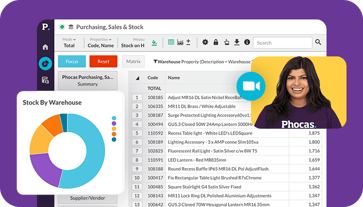
Find out how our platform gives you the visibility you need to get more done.
Get your demo today