What tools are necessary to carry out financial planning and analysis (FP&A) in a mid-size business? The safe answer is Excel spreadsheets. Yet the real requirement for running a business with a $10 to $250 million turnover is a planning tool that allows team members to improve decision making rather than build cumbersome financial models.
Many businesses are increasingly blending operations and want to report on cross-functional metrics, create income statements for many branches and carry out operational budgeting – so to achieve these activities, access to real-time consolidated data is essential within a planning tool.
We all know Excel spreadsheets are ubiquitous and the backbone of finance operations, but they have limitations especially around data management and collaboration. As Excel is readily available, the software is often stretched to use it for complex tasks like creating budgets and forecasts.
What about Excel add-ins?
Some businesses try to address these limitations by using Excel add-ins. These custom-built tools aim to extend Excel’s functionality for tasks like data integration, visualization and reporting. However, while Excel add-ins seem convenient, they come with challenges. They require installation, manual setup across workbooks and sometimes coding expertise to function effectively. For FP&A teams managing large data sets, this can mean more time spent troubleshooting than planning.
According to most surveys that ask business people what tools they use for budgets, the top of the list is usually Excel. But when follow-up questions are asked, like "are there any pitfalls to using Excel for creating budgets and forecasts?" often people have concerns around data consolidation, keeping data accurate or they find it difficult to reforecast regularly using Excel.
In this blog, we will investigate in more detail the results of the recent BARC planning survey 2026 where Excel was specifically compared with Phocas software, the popular BI and FP&A platform. Professionals who use both tools were asked the same questions, mostly around coping with large data volumes, performance and whether certain features brought them business benefits.
The differences between the two products are stark and what sets the Phocas FP&A software solution apart from Excel is the business intelligence capability built into Phocas. This data backbone allows a company to integrate many data sources from its ERP system, CRM and human resources information system (hris) as well as spreadsheets of sell thru data from third party vendors into a single source. Phocas's BI and analytics platform constantly updates which means whenever a new sale comes in to the ERP, the platform validates the data making sure it goes to the right database so that any financial report that is driven by sales also changes.
While Phocas integrates data seamlessly, Excel users relying on add-ins still face manual steps to keep data synced across systems. Unlike a dedicated FP&A tool, Excel add-ins lack pre-built connectors, so users must manually ensure accuracy and data flow, increasing the risk of errors. In contrast, FP&A software like Phocas automates these processes, ensuring your data is always clean, current, and ready for analysis.
BARC confirms Phocas is better for planning
BARC reviewed four broad areas between Phocas and Excel which were:
- problems
- business benefits
- likely to recommend
- satisfaction levels
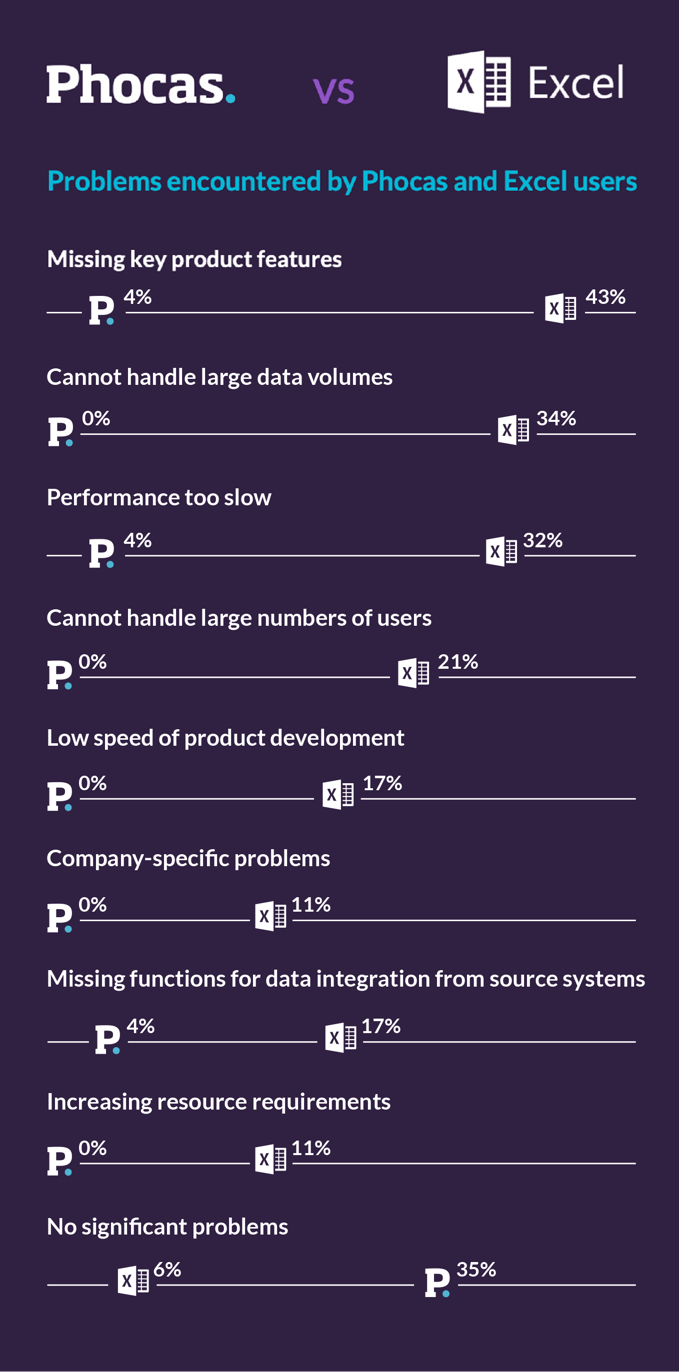
The problems were centered around data management, lack of product features and unreliability. There were six questions but be aware that BARC asks from the negative perspective so when the response is high then the business person agrees with the question and the sentiment.
1. Excel cannot handle large data volumes
34% of Excel users agree vs no (0%) Phocas users having issues with large data volumes. This is a distinct difference between the two products.
2. Excel performance is too slow
32% of Excel users say performance is slow vs 4% of Phocas users advising a slow performance. Many customers advise they use to have 152 sheets in Excel to build a budget so we're not surprised the updates were slow.
3. Excel cannot handle large numbers of users
21% of Excel users believe the software struggles with many users vs 0% Phocas users had seen issues with many users. Phocas has customers with up to 500+ people using the software at any one time.
4. Excel is missing functions for data integrations
17% of Excel users believe data integration from sources systems is missing vs 4% of Phocas users think integration tools are missing.
5. Excel is missing key product features
43% of Excel users think product features are missing from Excel vs 4% of Phocas users thinking the same. This is a huge gap and Phocas is shipping new features in all of its products weekly.
6. Low speed of product development
17% of Excel users have experienced a low speed of product development with Excel vs 0% of Phocas users
Questions 1 and 2 about handling data volumes and slow performance are the most telling, as these are the two main areas that affect finance teams and business people when doing analysis on consolidated data for queries. It’s important that your FP&A tools can optimize all the data you need to analyze so your decisions are holistic and you streamline ad hoc requests from across your team. No finance professional wants to work with master documents that they fear are going to break every time a report is pulled.
When it comes to reviewing business benefits, respondents were asked to indicate the two products' level of achievement across 12 potential benefits, which is called the Business Benefits Index (BBI). Phocas achieved a score of 6.3/10 for the BBI index compared to Excel at 4/10. 91% of Phocas users are willing to recommend the cloud-based planning software compared to 41% willing to recommend Excel.
Phocas goes further by eliminating the manual tasks associated with Excel add-ins. For example, users can analyze, budget and report directly within Phocas’s platform, without needing to piece together separate tools. FP&A software like Phocas is designed for speed and collaboration, with automation ensuring consistency and saving time across financial tasks.
When looking at specific comments from Phocas customers in BARC, users say:
Faster, live data available to users and transparent budgets and forecasts without the use of Excel, which users can access and update. Reporting and analytics have been a game changer for us.”
Head of Business Department, Retail, 100-2500 employees
Drives self-sufficiency in the business. Data is with the people who make decisions. Easy access to data.”
Member of cross-departmental BI team, Retail, 100-250 employees
These comments also point to access of data and people making informed decisions. Making accurate decisions is key to how everyone likes to work.
Phocas also helps the finance team claw back time and provides the functionality to do more value-added work such as analysis, custom reporting and sales forecasting.
There will be no need to pull 15 Profit and Loss (income statements) in Excel for each of your branches when using Phocas. With the data from all areas in the one system, reports are set-up initially in the format that each branch manager wants to see and then automated delivery from then on. To create flexible reports like this in Excel, it takes time and resource each week or month.
Phocas also allows you to create one click budgets from your profit and loss (income) statement in Financial Statements. This is a terrific feature which automatically provides an instant template version of a budget from your actuals. Finance and business partner stakeholders can continue to refine the numbers with workflow features and look up tabs to carry out scenario planning. This planning process also means finance teams can also start reforecasting after the books are closed each month.
The choice between Phocas and Excel depends on the specific objectives, scale, and complexity of your FP&A work and the size of your data sets.
Planning in features in Phocas vs. Excel
We have already covered data handling, speed and integration in BARC above. Here are some other comparisons of FP&A features and use cases.
| Feature | Phocas | Excel | Comments |
|---|---|---|---|
| Dashboards Phocas  Excel  Comments Phocas allows you to create limitless dashboards so everyone can see performance updates. | |||
| Ease of use Phocas Excel Comments Excel is easy to use for basic BI and FP&A tasks but when your data volumes increase or complexity comes into play, it’s not so easy. Phocas maintains ease of use for all complex tasks and automates data flow. | |||
| Collaboration Phocas Excel Comments Many people advise how collaboration is difficult in Excel and version control is a common issue. | |||
| Permissions Phocas Excel Comments In built permissions allow people to see only what they’ve been granted access to in Phocas while passwords in Excel can create version control problems. | |||
| Data security Phocas Excel Comments Phocas offers a secure end-to-end solution, partnering with technology partners like AWS and SOC2 Type2 compliance. | |||
| Flexibility Phocas Excel Comments Both tools are flexible, but Phocas has the ability to customize reports and then automatically dispatch. | |||
| 3-way cash forecasting Phocas Excel Comments With all data and reports connected, cash flow is always up to date in Phocas. | |||
| Headcount planning Phocas Excel Comments Collaboration is clear and simple with the built-in headcount tool in Phocas. |
Finance professionals often say data, reporting and manual tasks are the three biggest problems in FP&A with the cleaning and combining of data the biggest challenge. The heart of the value proposition of Phocas over Excel for FP&A tasks is automation and data wrangling annd cleansing.
The increasing complexity in the mid-market such as more data volumes, more pressure to deliver and operating in a market that requites strong planning means business people need software that is intentional and made for data-driven decisions.
The biggest opportunity for finance people is to be a business partner and bring insight and intelligence to the business from external and internal data sources which can be achieved with an FP&A tool like Phocas.
To review more providers against Phocas and learn more about how customers rate Phocas BI and FP&A you can click the full BARC report below.
Phocas in the BARC Planning Survey 26
Download now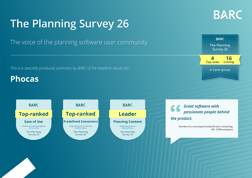


Katrina is a professional writer with a decade of experience in business and tech. She explains how data and AI can work for distribution professionals and finance teams without all the tech jargon.
Related blog posts




Browse by category
Find out how our platform gives you the visibility you need to get more done.
Get your demo today