More control, deeper analysis, and new ways to explore your data with Flex Modes
Flex Modes helps you ask better questions and uncover deeper insights. Now you'll have more control over how you filter, structure, and explore your data — and it's easier to dig into the transactions that drive your business.
- Powerful filtering and queries for faster answers
Focus on what matters, use conditional formatting for comparisons, and explore complex scenarios with confidence - Customized grid view for clearer insights and reporting
Cut through noise, instantly compare time periods with precision, and present data the way it needs to be seen - Drill in to details with flexible Transaction Mode
Use powerful analysis tools to make comparisons, gain insights and analyse results at transaction level
 Analytics
More updates you might be interested in
 Analytics
 Flex Modes Alerts: enhanced alerts and subscriptions
Updates to alerting and subscriptions in Flex Modes make it easier to monitor important values, share insights and notify the right people when things need attention.
-
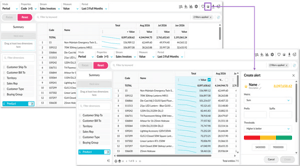
Create alerts on any value column
Set alerts on any value column, including calculation columns. Choose whether higher or lower values are better, set thresholds, and get notified when values reach a red, yellow, or green status—or move between statuses. -
See what needs attention faster
Alerts appear on your homepage by default, with optional email notifications. When multiple alerts trigger at once, Phocas combines them into one email, sorted from red to green, with alert descriptions for added context. -
Share insights through improved subscriptions
Flex Modes subscriptions make it easier to stay on top of key updates with flexible scheduling, bundled emails, and secure report downloads.
 Analytics
 Flex Modes analysis: deeper analysis and more customized report creation
Flex Modes updates make Analytics even more powerful, helping you move from high-level results to the transactions behind them and continue analyzing without losing context.
-
Dig into transaction detail
Open transaction-level detail from the Transaction view, Mode menu or a grid cell. Your filters and selections carry through, so you can investigate without starting again. -
Build deeper analysis in context
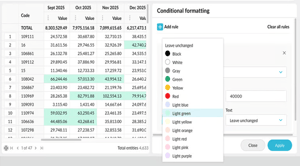
Add transaction properties, dimensions and dimension properties to your view, then nest data to understand the relationships behind a number. This creates more context for reporting and helps you build deeper analysis without leaving your view. -
More control, better insights
New controls for comparisons, filtering, calculations, conditional formatting, transactions and exports help you move faster, keep context in view and get to insights with fewer clicks.
 Analytics
 Analytics Dashboards: an entirely new dashboards experience is in beta
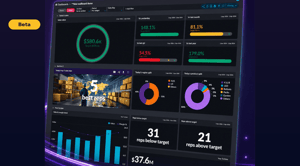
Major enhancements are coming to one of the most important experiences in the Phocas platform. Upgrades are based on customer feedback, including more flexible layouts and presentation options to turn business data into clear, engaging information.
-
Turn dashboards into wallboards
Fit-to-page and compact-header options make better use of screen space, making dashboards easier to display on TVs and large screens. -
Create a more polished, branded experience
Use brand colors, dark mode, images and flexible layouts to create dashboards that reflect your business and highlight important information. -
Move from the headline to the detail
Flip a dashboard card to see the grid behind a value and understand what’s contributing to the number. -
Share sharper PDFs
Improvements to PDF output make dashboard content, including images, tabs and grids, render more cleanly when printed or presented.
 Analytics
 Turn reporting into real-time discovery
A major shift from passive reporting to active discovery. Analytics now delivers richer, more flexible ways to explore your data – with Flex Modes, cross-stream measures and synced views that make answers faster to find.
See how you can run complex calculations, instantly flag outliers and harness Phocas AI to get instant answers delivered in plain language. Plus much more.
