What’s new in Phocas

Watch the Sep 2026 product updates webinar
Join the Phocas team as they walk through recent releases and enhancements, plus a look at what's coming next. Watch the recording to pick up practical tips and see the questions and feedback shared directly with the teams building and supporting Phocas.
We run these sessions regularly throughout the year to keep you close to how the platform is evolving, so you can take advantage of new features as they land and get more value from Phocas every day.
This session covered near-term roadmap priorities so you can plan ahead, and quick wins you can apply straight away.


Faster setup, easier maintenance and enhanced analysis in Financial Statements
Less manual work and simpler statement management help finance teams get up and running faster and maintain reports with less effort.
-
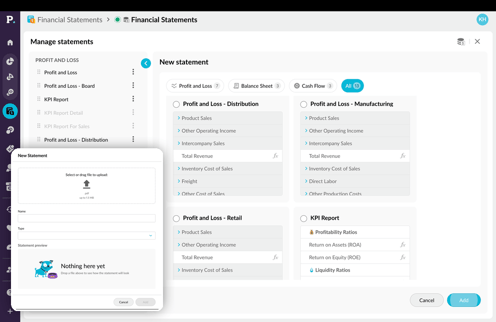
Templates and statement upload from PDF
Build from a template, or create a new statement in minutes by importing a PDF statement straight from your ERP with structure, inferred automatically and ready immediately -
Start faster with AI powered account mapping
AI suggests account groups for unmapped accounts and shows a confidence rating on every suggestion, so you can bulk-accept the ones you trust and only review the rest.

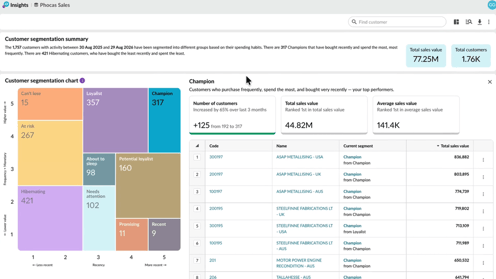
Smarter Sales Insights powered by AI
The latest updates to Sales Insights bring even more AI into your sales workflows. Your reps get a clear read on every account and their best opportunities ranked automatically, so preparing for a call takes minutes, not hours. Another step in making selling easier.
-
AI customer summaries [early access]
Get a concise overview or a more detailed narrative with context. Open the account before your call and the summary's already there: what's changed, what's dropped off, what's growing, pulled straight from the account's own history. -
AI ranked opportunities [early access]
Overdue reorders to revive, cross-sells to pitch, the product to lead with, each one ranked by what it's actually worth.

A simpler, faster CRM designed for reps on the move
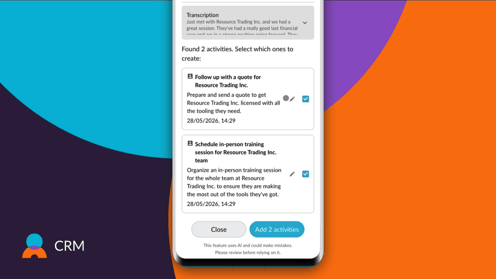
Every update to Phocas CRM comes back to one goal: making it easier for your reps to use. This release brings AI-powered activity capture, visual pipelines and a refreshed interface, less admin, less friction, more time to sell.
-
Capture sales activity with AI voice to task
Turn spoken updates into tasks and notes quickly, helping reps keep customer records current while on the move. -
Manage opportunities with visual pipelines
See deals by stage, understand what’s moving and quickly spot where follow-up is needed. -
Work faster in CRM
A refreshed interface, improved filtering and search, better record handling and stronger mobile usability make everyday CRM work easier. -
Turn insight into action
CRM is increasingly connected with the rest of Phocas, making it easier to move from customer insight to assigned activity and follow-up.

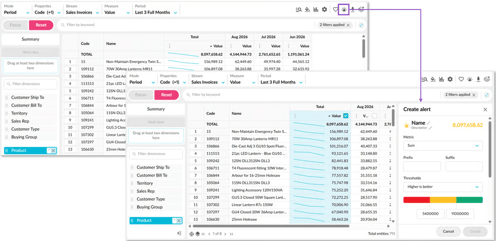
Flex Modes Alerts: enhanced alerts and subscriptions
Updates to alerting and subscriptions in Flex Modes make it easier to monitor important values, share insights and notify the right people when things need attention.
-
Create alerts on any value column
Set alerts on any value column, including calculation columns. Choose whether higher or lower values are better, set thresholds, and get notified when values reach a red, yellow, or green status—or move between statuses. -
See what needs attention faster
Alerts appear on your homepage by default, with optional email notifications. When multiple alerts trigger at once, Phocas combines them into one email, sorted from red to green, with alert descriptions for added context. -
Share insights through improved subscriptions
Flex Modes subscriptions make it easier to stay on top of key updates with flexible scheduling, bundled emails, and secure report downloads.
Flex Modes analysis: deeper analysis and more customized report creation
Flex Modes updates make Analytics even more powerful, helping you move from high-level results to the transactions behind them and continue analyzing without losing context.
-
Dig into transaction detail
Open transaction-level detail from the Transaction view, Mode menu or a grid cell. Your filters and selections carry through, so you can investigate without starting again. -
Build deeper analysis in context
Add transaction properties, dimensions and dimension properties to your view, then nest data to understand the relationships behind a number. This creates more context for reporting and helps you build deeper analysis without leaving your view. -
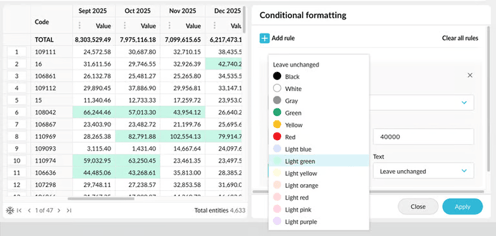
More control, better insights
New controls for comparisons, filtering, calculations, conditional formatting, transactions and exports help you move faster, keep context in view and get to insights with fewer clicks.
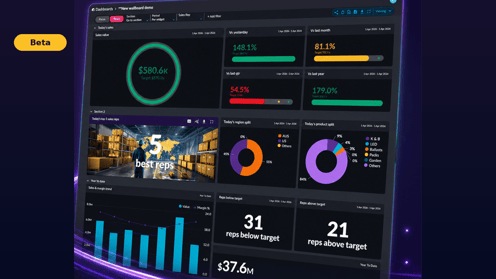
Analytics Dashboards: an entirely new dashboards experience is in beta
Major enhancements are coming to one of the most important experiences in the Phocas platform. Upgrades are based on customer feedback, including more flexible layouts and presentation options to turn business data into clear, engaging information.
-
Turn dashboards into wallboards
Fit-to-page and compact-header options make better use of screen space, making dashboards easier to display on TVs and large screens. -
Create a more polished, branded experience
Use brand colors, dark mode, images and flexible layouts to create dashboards that reflect your business and highlight important information. -
Move from the headline to the detail
Flip a dashboard card to see the grid behind a value and understand what’s contributing to the number. -
Share sharper PDFs
Improvements to PDF output make dashboard content, including images, tabs and grids, render more cleanly when printed or presented.

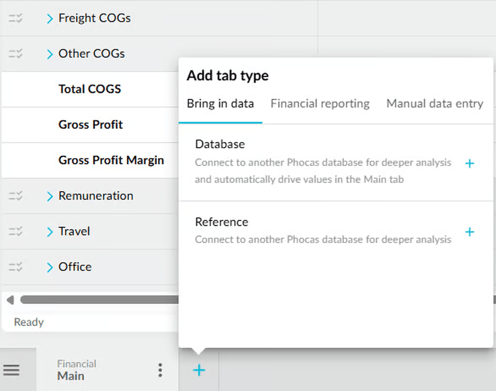
User experience enhancements improve Budgets & Forecasts
Save worksheet preferences, model repeating patterns, and navigate setup more smoothly.
-
Persistent worksheet tab preferences
Your tab display choices are now saved and restored automatically. -
New MOD function
Budgets & Forecasts now supports MOD for repeating calculation patterns. -
Reorganized Add Tab menu
Tab types are now grouped into clearer categories, making them easier to find.
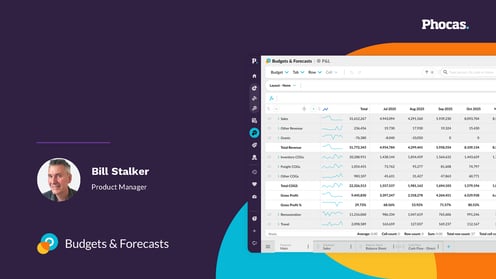
Workforce Planning: A new way to plan salary, FTE and benefits in Budgets & Forecasts
Now in beta, Workforce Planning lets you build your own dimensions, plan every type of worker, and see it flow straight into your budget's P&L.
-
Plan every type of worker, hourly included
Model salaried, waged, casual and hourly staff side by side, so the detail that usually complicates workforce planning is handled without extra workarounds. -
Model your way with custom dimensions
Go beyond a fixed set of fields — group and plan by department, role, work type or any custom dimension that matches how your business works. -
Time-phase changes that flow straight into your P&L
Model pay increases, bonuses and benefits in advance, publish through to Analytics for deeper reporting, and watch it drive your budget's P&L automatically.

Smarter admin tools for clearer, more usable data
New Administration enhancements make it easier to maintain your data model while helping users better understand the data they're working with. Add glossary descriptions that appear directly in Analytics, and manage database items more efficiently with in-context editing.
-
Glossary descriptions in Analytics
Add plain-language descriptions to databases, measures and dimensions in Designer. They appear as tooltips in Analytics, so users can understand fields without leaving the grid. -
Rename and reorder database items
Rename and reorganize dimensions, properties, measures, and streams right where you're working. Changes take effect immediately, so maintaining your data model is faster.

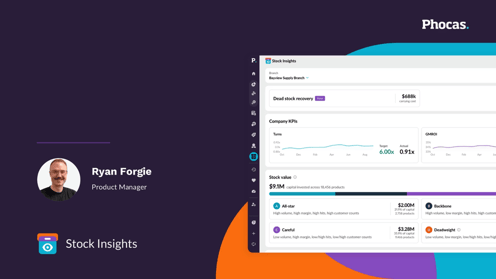
Introducing Stock Insights - a brand-new inventory intelligence solution in the Phocas platform
Built with customers to solve inventory problems that impact your bottom line, Stock Insights uses the data you already have in Phocas to help you make confident inventory decisions and turn your inventory data into actionable insights with real financial impact. Stock Insights is available to select Phocas customers; connect with your Phocas Account Manager to learn more.
-
Stop guessing how much money inventory is costing you
-
Get visibility on your stock KPIs
-
Know what to stock and where your cash is trapped
-
Turn your inventory data into financial decisions with actionable insights
Explore what's coming soon with Phocas
There's more on the way. Here's a look at what's coming next to the Phocas platform, so you can plan ahead and see where it could add value for your business.
-
Workspaces, powered by PACE
Secure, embedded Conversational AI is coming to Phocas Analytics so you can explore your data with natural language and extract insights in new and powerful way. -
Financial Statements Excel plug-in
Bring Phocas Financial Statements data into Excel, keep it synced, and use it in the custom workbooks and reporting workflows your finance team already relies on. -
Financial Statement styling
Get more control over how statements look on screen and in exports, with flexible row-level and bulk formatting options.

See the latest features in action
Join the Phocas team for a curated walkthrough of recent releases and enhancements and a look at what's coming. Learn practical tips, ask questions and share feedback directly to the teams building and supporting Phocas.
We're running these sessions regularly throughout the year to keep you close to how the platform is evolving – so you can take advantage of new features as they land and get more value from Phocas every day.
You'll get a preview of near-term roadmap priorities so you can plan ahead, pick up quick wins to apply new capabilities straight away and get direct access to the teams building and supporting Phocas. Plus, test your knowledge for a chance to win a $250 Amazon voucher.
More connected workflows and faster action with Sales Insights
Insights now works more seamlessly with the rest of Phocas, helping you move faster and act on opportunities without breaking your flow. You can take action directly from Insights or dive deeper into your data with connected tools for richer analysis.
What’s new
- Open customer segments in Flex Modes
Jump straight from a segment to Flex Modes, with customers automatically applied as a filter so you can explore their transactions, products, and trends in more detail. - Create CRM tasks directly from Insights
With a CRM license, create tasks in bulk without leaving Insights—so you can quickly act on key customers and keep your sales workflow moving.
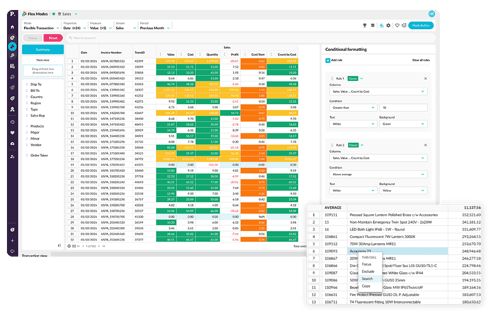
More control, deeper analysis, and new ways to explore your data with Flex Modes
Flex Modes helps you ask better questions and uncover deeper insights. Now you'll have more control over how you filter, structure, and explore your data — and it's easier to dig into the transactions that drive your business.
- Powerful filtering and queries for faster answers
Focus on what matters, use conditional formatting for comparisons, and explore complex scenarios with confidence - Customized grid view for clearer insights and reporting
Cut through noise, instantly compare time periods with precision, and present data the way it needs to be seen - Drill in to details with flexible Transaction Mode
Use powerful analysis tools to make comparisons, gain insights and analyse results at transaction level
Tailored sales insights, powered by more advanced segmentation
Shape Insights to better reflect how your business works, with more control over segmentation, data inclusion, and how transactions are defined. These enhancements help ensure your insights are cleaner, more relevant, and aligned with your real-world operations.
What’s new
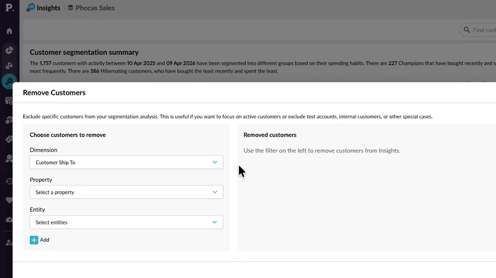
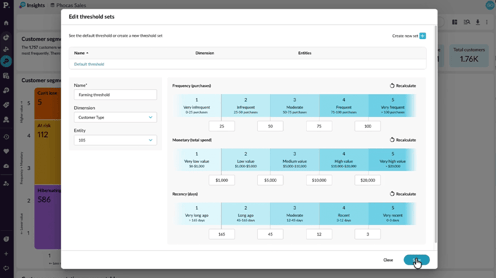
- Remove customers
Exclude specific customers from Insights calculations entirely—so inactive accounts, closed customers, or outliers don’t skew your results. - Define threshold sets
Apply different segmentation thresholds to different customer groups, making your value bands more accurate and meaningful for how your business operates. - Define your transaction property
Choose which field defines a transaction—such as Invoice Number or Order Number—so frequency and related metrics align with how your business tracks activity.
Simpler creation, greater flexibility, and more control with Financial Statements
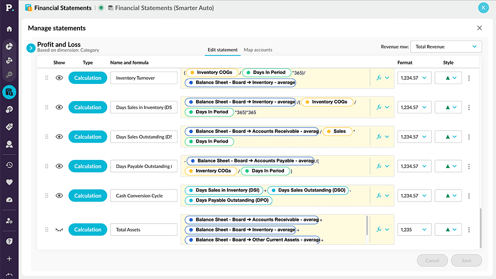
Manage statements has been upgraded to give you a more intuitive and flexible way to create, edit, and organize your financial statements. With a cleaner layout and improved editing experience, it’s easier to build, customize, and manage statements with confidence.
What’s new
- Export exactly what you need
Export values only on new style workbooks, removing formula complexity and speeding up even the most data-heavy spreadsheets. - Improved editing experience
A more intuitive editing area with clearer tabs, simplified controls, and flexible styling makes it easier to customize statements and understand how they’re structured. - Simpler formula creation
Build calculations faster with click-to-select references and an improved formula experience—no need to rely on complex syntax or documentation. - Better visibility and control
Clearer options for showing/hiding items, setting performance direction, and styling rows give you more precision over how your statements are presented.
Smarter Admin controls for better data and scheduling
New admin enhancements give you more power in how you manage data, scheduling, and access—making it easier to keep everything up to date and aligned with your business needs.
What’s new
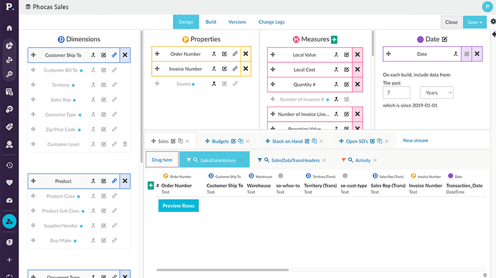
- Views/Items visibility in Sync Sources
The Sync Sources grid now shows both the number of views and total items for each source at a glance, making it easier to understand source contents without opening each one. - Smarter scheduling for builds and mappings
Schedule database builds and CRM mapping updates to run after selected sources sync, so updates happen as soon as relevant data is available. - Date offset filters
Create dynamic filters using relative dates (like last two weeks or last month), making recurring reports easier without relying on fixed dates. - AND/OR filter logic
Choose how multiple filter items are combined, giving you more precise and flexible control when building streams and data views. - SSO improvements
A smoother, more reliable single sign-on experience makes it easier for users to access Phocas securely.
Phocas product highlights 2025
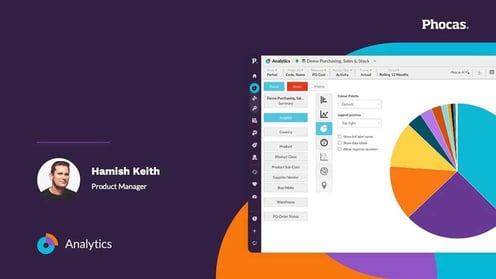
Catch up on everything new in Phocas from 2025 and get a first look at what’s coming in 2026. This interactive virtual event brings you practical tips, insider tricks and real use cases to help you get even more from your Phocas platform.
Hear from our customer and product teams as they recap the year’s biggest updates, show what’s on the horizon, and give you a chance to ask questions and share feedback.
From new Flex Modes in Analytics to Sales Insights, smarter budgeting tools and journal functionality in Financial Statements – 2025 was a big year for the Phocas platform. Whether you caught every release or just want to see the highlights, this session brings it all together in one fast-paced, practical hour.

Turn reporting into real-time discovery
A major shift from passive reporting to active discovery. Analytics now delivers richer, more flexible ways to explore your data – with Flex Modes, cross-stream measures and synced views that make answers faster to find.
See how you can run complex calculations, instantly flag outliers and harness Phocas AI to get instant answers delivered in plain language. Plus much more.
From insight to action in one seamless workflow
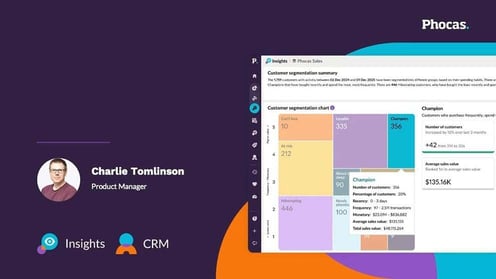
Phocas now gives sales teams a clearer path to revenue with two tightly connected tools. Insights delivers out-of-the-box visualisations, drill-downs, smart search and powerful filters. Helping reps surfaces at-risk accounts and high-value opportunities instantly.
Alongside Insights, the refreshed CRM delivers a smoother, modern experience with faster filtering, mobile optimisation and Outlook calendar sync, so reps can act on those insights without friction. Together, they create a seamless workflow – spot the opportunity in Insights, jump straight into CRM to follow up and keep every conversation moving.
Close faster with connected financials
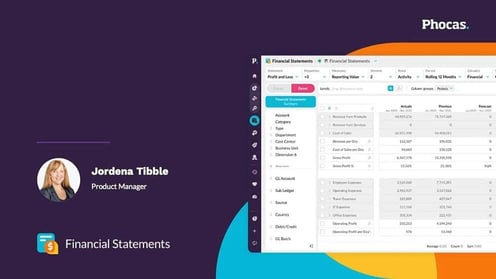
Financial Statements got a modern “glow up” with integrated journals, eliminations and advanced scenario planning that keep everything connected to your ERP.
Create, duplicate and reverse journals without leaving Phocas and analyse your group results with more accuracy and less spreadsheet work. Watch how you can speed up month-end close by up to 50%.
Plan with more flexibility and control
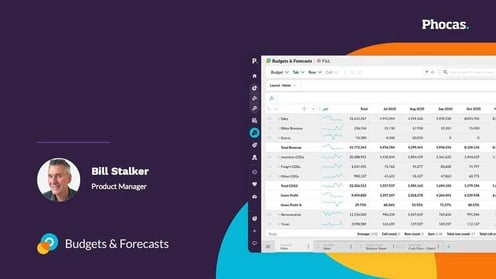
Budgeting and forecasting are now more flexible and collaborative. Split baselines, tabbed hierarchy views and automated ‘any’ mapping help teams start planning earlier and stay aligned as things change.
See how these updates give you clearer visibility into where you’re headed and how much capacity you have left to spend.
 Rebates