Set up and connect CRM
6:29 minutes total learning time
This module takes you through connecting your Microsoft 365 calendar and setting up CRM account mapping. These videos introduce key steps to help keep your activities and data aligned.
Phocas product  CRM
CRM
CRM 2 videos in this learning module
1
Integrate your Microsoft 365 Outlook calendar
2:25
2
Map accounts
4:04
2 videos in this learning module
1
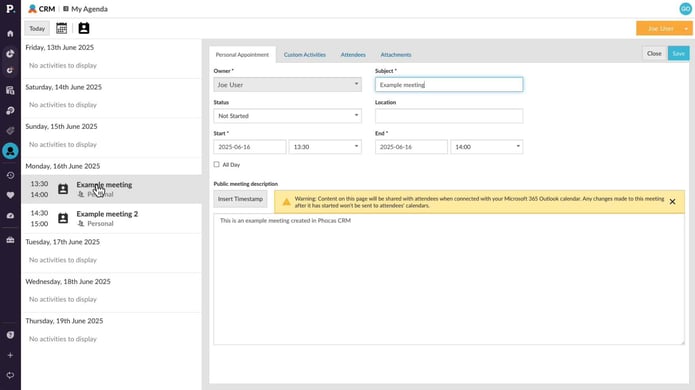
Integrate your Microsoft 365 Outlook calendar
2:25
2
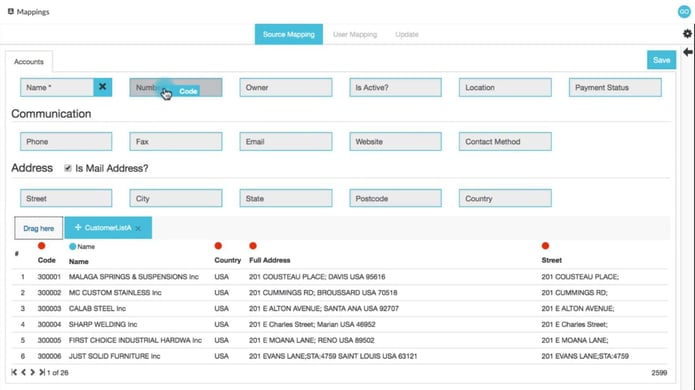
Map accounts
4:04
Integrate your Microsoft 365 Outlook calendar
Learn how to connect Phocas CRM with your Microsoft 365 Outlook calendar to enable two-way synchronization. This helps streamline workflows, save time, and reduce the risk of missed meetings or scheduling conflicts.
Supporting documentation
Map accounts
The CRM mapping tool provides a simple way for administrators to push customer data into Phocas CRM, as accounts, without the need for scripts or extensive prep work.
Supporting documentation
Phocas product
CRM 
Related learning modules
 CRM
CRM Get started with CRM
This module covers accessing your agenda, activities, and the CRM dashboard in Phocas CRM, as well as adding activities and using AI voice to quickly capture meeting notes and follow up tasks, helping you and your team stay on top of customer management.
4 videos
10:39 min
 CRM
CRM Manage CRM items
This module covers creating and editing accounts, campaigns, contacts, and pipelines in Phocas CRM, helping you and your team stay on top of customer management and sales opportunities.
4 videos
11:03 min
