Configure brackets
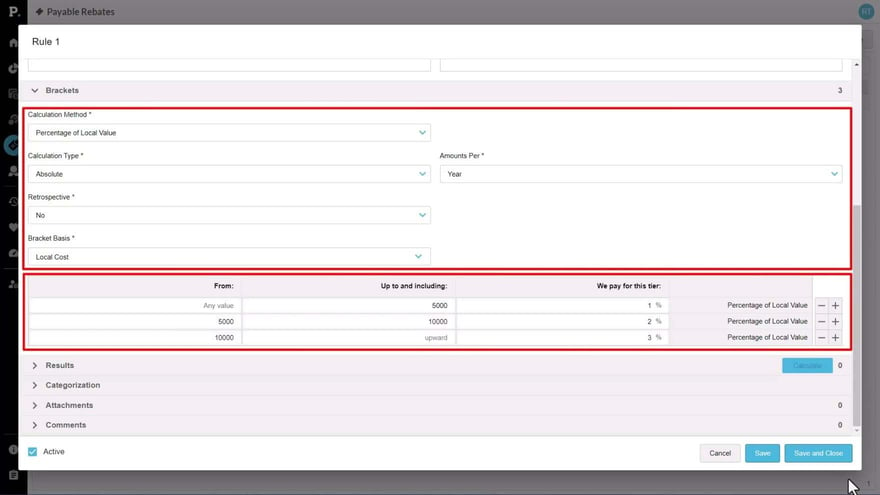
Learn how to configure the Brackets section of a rebate rule. You set bracket conditions such as calculation method, calculation type, retrospective, and the basis measure, then define tiers with From, And, and Up To and Including values that reflect either a monetary amount or a unit count, depending on the measure.
Supporting documentation

Related video tutorials
 Rebates
Analyze rebate performance
Learn how to use the rebates analysis and near miss analysis databases to see where rebate amounts are paid out by rule, bracket, or agreement, and which customers or suppliers they're based on. You also learn how to visualize the results, add them to a dashboard, and, as a customization, blend rebates into your sales data to compare value and profit before and after rebates.
 Rebates
Configure retrospective rules
Learn how the retrospective bracket condition affects a rebate rule's results. A rule set to the full amount applies the top bracket percentage to all transactions, while a non-retrospective rule gives each increment the percentage of the bracket it falls into. You compare both calculations in the Results tab to see the difference in the rebate amount.
 Rebates
Configure pro rata rules
Learn how to configure a pro rata rebate rule that forecasts the final rebate amount for a twelve month period at an earlier point in the year. You set the amounts per option to year, set retrospective to yes, choose Linear or Seasonal, and see how calculating through a later month can move the forecast bracket.
 Rebates
Post calculation results
Learn how posting calculation results saves them to your rebates database and locks them for that calculation period so later runs don't overwrite them. Posting doesn't issue a payment or claim or write data to your ERP system. You can post from the rule or in bulk from the Results tab, and a rule with posted results can't be edited or deleted.