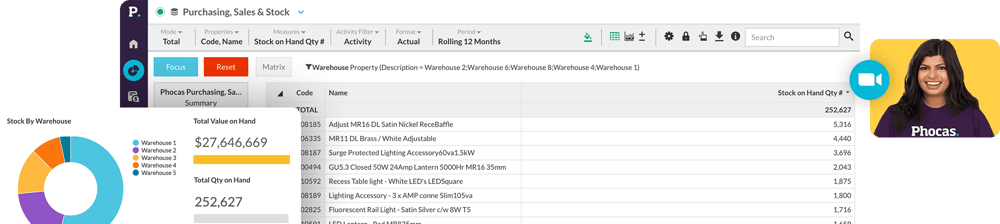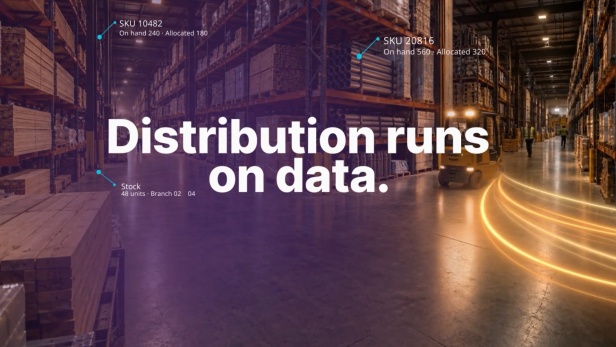
Confident decisions. Delivered.
Phocas Analytics at a glance
Who is it for?
Typical implementation
Core capabilities
What teams use it for
All your data in one place
Get more from the ERP you’ve invested in, with every team working from the same clean data.
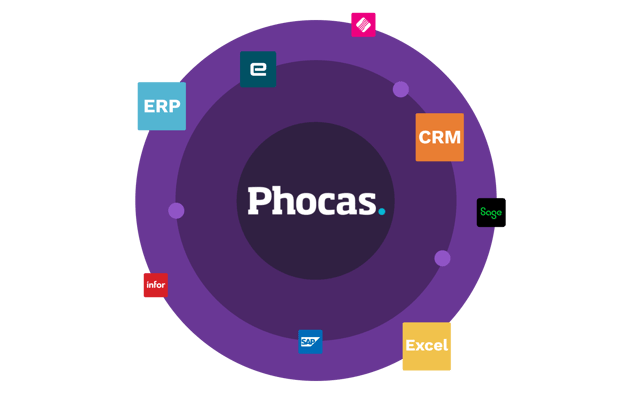
- Your ERP plus CRM, sales, inventory, AR/AP, purchasing and Excel data, together in one platform
- 25 years of experience with the ERPs distributors and manufacturers run on, such as Epicor, NetSuite, Infor, Kerridge, Sage and SAP
- Data is mapped and validated, then synced daily or as needed, so dashboards, reports and AI answers draw on current numbers
-
Move to a new ERP or combine several after an acquisition, and reporting keeps working from one consistent set of numbers
Customer testimonials
Customer quote
"Seamless integration to ERP systems. Quick access, short query time. The easiest tool to roll out into operational space."
Customer quote
"Life before Phocas for us was more painful, we had lots of different sources of data, coming from different streams and when we implemented Phocas it really pulled it all together."Your data has answers. Now you can just ask.
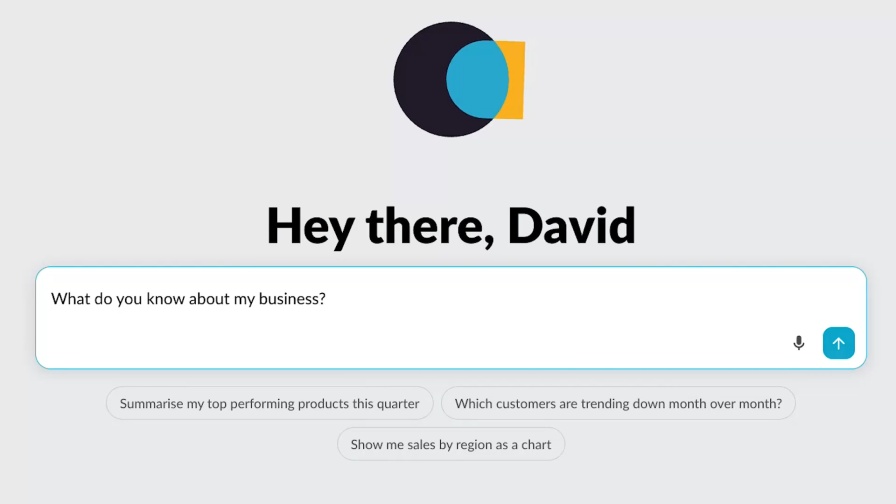
Conversational AI that already knows your business: chat with your ERP data using Workspaces, powered by PACE, the Phocas Agentic & Conversational Engine.
-
Ask and follow up as often as you like across sales, purchasing and finance data in a single question
- Answers come from the same clean, modeled data behind your dashboards and reports
- Open any answer directly in the Grid to drill to the transaction, build a dashboard or chart, save it as a favorite or share the conversation
-
Every answer carries a confidence score: high when it came straight from your data, lower when it was inferred or estimated, or when not all the data was present
- Workspaces only answers from your Phocas data, respects each person's existing permissions, and never uses your business or transaction data to train shared or public AI models
- Gets more useful the longer you use it, learning more context and preferences over time
Analytics in action: Take a video tour
See Analytics put to work through a series of short videos. Highlighting common pain points and the specific solutions Phocas delivers.
-
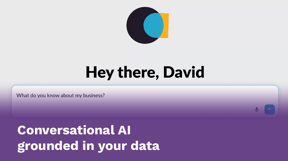
Conversational AI grounded in your data
Explore Workspaces, powered by PACE - Phocas' Agentic and conversational AI Engine. Anyone can explore, ask, and arrive at strategic insight grounded in the Phocas data you trust. -
Quick and easy access to data
Learn how you can get quick and easy access to the information you need to make data-driven decisions with trusted data that’s pulled fresh from your ERP. -
Self-serve reports and alerts
Break-free of the cycle of back-and-forth report requests and revisions with IT. Take a look at how easy it is to set up reports and alerts in Phocas. -
Drill down and follow your train of thought
Learn how Phocas lets you drill into your data to get super-fast answers and understand what is happening and why. -
Identify opportunities to grow sales
See how Phocas can grow sales by helping your reps quickly identify easy wins, such as cross-sell opportunities in a few clicks. -
Track profitability of sales
With Phocas you can easily track the actual margins you’re making and identify customers who may be less profitable than they first appear. -
Optimize stock
Forget managing stock using your ERP or spreadsheets – see how Phocas makes it super easy to stay on top of your inventory.
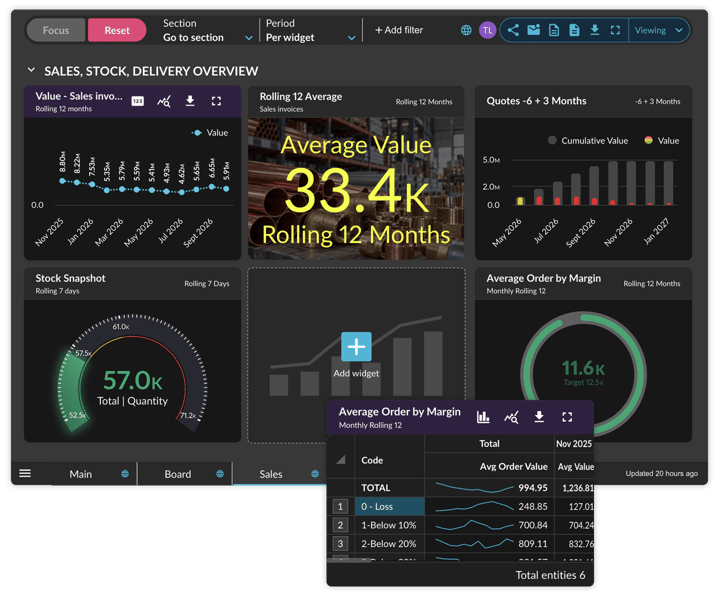
Interactive dashboards that are easy to create, share and understand at a glance
Anyone on your team can create a dashboard worth looking at, and it looks sharp on a phone, a warehouse wall or in a PDF.
- Apply your brand colors, logo, dark mode and images placed directly on the dashboard
- Wallboard display fits a large screen without scrolling and stays up to date without logging back in
- Choose the best vizualisation for the job, flip any card to see the detail behind the number, and quickly jump from high level KPIs to underlying data to slice, dice and answer questions
- Start from a ready-made template or use AI to create what you need with less effort (beta)
-
Combine databases such as purchasing and sales on one dashboard, and export a clean PDF with grids, tabs and filters that make insights easy to explore
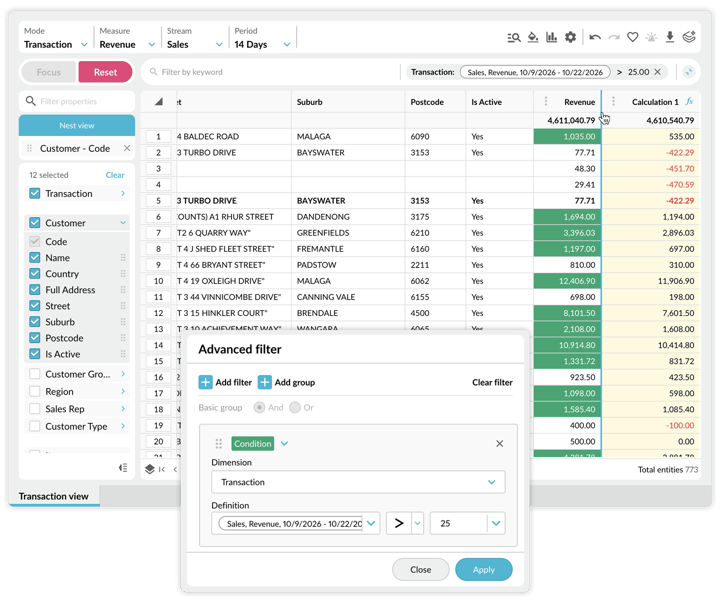
User friendly ad hoc analysis and reporting, down to transaction detail
- Drill from a headline number to cost center, GL code and the individual transaction in the Grid
- Build reports your way: add calculation columns from a familiar function list, and set conditional formatting rules that highlight outliers automatically
- Open transaction mode to work through every transaction behind a number, with your settings carried across
-
Save reports and share them with your team, or set alerts on any value column, including status changes
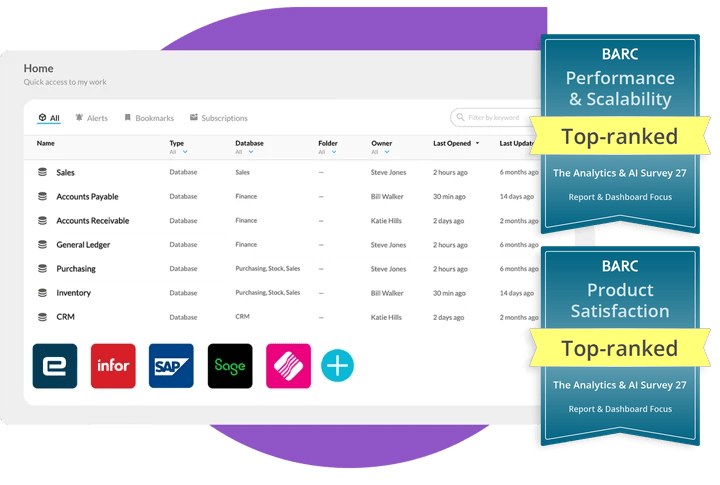
Ranked #1
for product satisfaction and performance & scalability
"It‘s the king of ad-hoc analysis systems, highly flexible and user friendly, the ability to drill down to transactional level detail and back up to high level numbers in 1 or 2 clicks is great for non technical users."
Project Manager BI/Analytics, IT
Construction >2,500 employees
BARC The Analytics & AI Survey 27
Expert-led implementation, full support
People choose Phocas because they see value quickly and get support that leads to high ROI and successful outcomes.
- A dedicated implementation consultant guides you from discovery to go-live
- Your ERP is connected, mapped and validated against existing reports
- Out-of-the-box dashboards and reports with KPIs for your role and industry are ready from day one
-
Training at go-live and ongoing support from specialist teams in the US, UK and ANZ

The product's brilliant, but more importantly, the support, technical knowledge and flexibility of the product.
Implementation Success
Report & Dashboard Focus peer group
| Product | Implementation Success |
|---|---|
| Phocas | 8.33 |
| Qlik Sense | 8.2 |
| Domo | 8.2 |
| Power BI | 7.6 |
| Tableau | 7.3 |
How one distributor
gets more from its data
Central Pro Supply is a leading distributor of irrigation and landscape supplies with locations across the US and Canada. Before Phocas, the business struggled with complex reporting tools, low user adoption and time-consuming financial processes that made it difficult to understand performance across departments. Here's how the business is now using Phocas across their teams.
Everyone starts from the same three KPIs: total sales, margin dollars and margin percentage against last year. Each team then drills into the numbers that matter to their role.
Reps track buying patterns, from customers who haven’t reordered since early in the season to accounts with declining purchases in a product category. They walk into meetings with insights the customer doesn’t have. One rep even built out a precise call list to start the season.
Branch, purchasing and inventory teams monitor stock levels, evaluate supplier performance and see shifting demand across locations, using dashboards built for their role.
Finance, AR and AP each work from dashboards built for their role. Accounts receivable tracks daily call lists, outstanding balances and payment trends, so the team stays ahead of delinquencies and sees its impact on cashflow.
Giving everyone the same starting point means people are having the same conversations about performance.
Self-serve BI for power users and non-technical users
Everyone from the sales rep to the CEO can build reports, use dashboards, and harness AI to do analysis on their own.
- A familiar spreadsheet-style interface and clear report formatting makes it easy to build reports
- User friendly for anyone to slice, dice, and drill into the detail for deeper insights
- Easily save and share data via alerts and dashboards
- Workspaces AI makes all of this even easier
- Administrators can add data sources and configure Phocas with drag and drop
-
Phocas Academy courses and the user forum help every team become self-sufficient and stay up to date on the latest features
Only Phocas gives general users the flexibility to drive further into reports without needing to involve IT.
Self-Service & User Experience
Selected products from the Report & Dashboard Focus peer group.
| Product | Self-Service | User Experience |
|---|---|---|
| Domo | 7.8 | 8.2 |
| Phocas | 7.7 | 8.1 |
| Qlik Sense | 7.4 | 8.0 |
| Power BI | 7.1 | 7.5 |
| Tableau | 6.8 | 7.3 |
| Peer group average | 7.4 | 7.7 |
Phocas Analytics benefits
Ad hoc analysis
Build the report you need and follow any number to the transaction, for example to find customers below a margin threshold.
Conversational AI
Chat with your ERP data, for example to summarize your top-performing products this quarter.
Dashboards
Give every team a clear picture of performance on any screen, for example a sales dashboard on the warehouse wall.
Collaboration
Get everyone working from the same numbers, for example a margin dashboard shared with the whole sales team.
Reporting
Create reports that keep your whole team on track, from high-level KPIs to the detail that drives performance. For example a weekly branch sales report sent to every manager.
Security & compliance
Bring data into every workflow safely, with permissions that control who sees what. Like branch managers seeing only their branch. SOC 2 Type 2 and GDPR compliant.
Phocas vs Power BI & Tableau
Power BI / Tableau fit best if you
- Have in-house teams to manage implementation: data prep, testing, onboarding, ongoing maintenance
- Have in-house teams to handle ongoing report building and customization requests
- Need highly custom visuals or analytics embedded in your own software
Phocas fits best if you
- Run a distribution or manufacturing business and want self-serve reporting and ad-hoc analysis built around connected data
- Want sales, purchasing, finance and branch teams to answer their own questions without waiting on IT
- Don't have a data team to build models, write DAX or manage a gateway
- Want room to grow on one platform: add Financial Statements, Planning, Sales Insights, CRM, Rebates, on the same trusted data
-
Prefer a dedicated implementation team for setup plus ongoing global support
Phocas Analytics FAQs
Business intelligence (BI) software gathers data from systems such as your ERP and CRM, brings it together and turns it into reports and dashboards that people can act on. Business intelligence analysis is the work of exploring that data to see what is happening in the business and why.
Yes. Phocas connects to more than 200 data sources, including ERP, MRP, finance and CRM systems, through API connectors or SQL and text-file extracts from your servers. ERPs that Phocas commonly connects to are Epicor, Infor, Klipboard, Microsoft, MYOB, NetSuite, Sage and SAP. See the full list on our integrations page.
Yes. Phocas is built for power users and non-technical users alike. Built-in dashboards and reports are ready from day one, and users can create and save their own reports, alerts and dashboards, or ask Workspaces a question directly. Every customer gets introductory training at go-live and ongoing support from our global support teams.
Yes. Workspaces, powered by PACE, answers questions from your own sales, purchasing and finance data. Every answer carries a confidence score and shows the data it used: high when it came straight from your data, lower when it was inferred or estimated. Open any answer in the Grid to drill to the transactions behind it. Workspaces is in beta and available to eligible Phocas customers.
Phocas stores your data in a secure data warehouse as part of the service, and it syncs daily or as needed.
Phocas uses role-based access and layered permissions on a secure cloud platform that is SOC 2 Type 2 and GDPR compliant. All AI in Phocas, including Workspaces, runs inside the Phocas Trust Layer, the same permissions, security and governance already protecting your business. Your business and transaction data are never used to train public AI models.
Phocas implementations run between 8 and 12 weeks on average. A dedicated implementation consultant is your main contact. Phocas connects your ERP and other sources, validates the data against your existing reports and trains your team. You provide a project sponsor, an ERP or IT manager and a subject-area expert. Timelines depend on how ready your ERP and data are and business complexity. Learn more about Phocas implementations here.
Very little day to day. Once Phocas is live, your data updates daily or as needed. Your business administrator mainly adds or removes users and controls who can see which data. A few times a year they might adjust your setup, such as adding a new field or updating periods at year end. Our implementation team handles the technical build, and our support team helps after go-live.
We don’t publish a price list because every Phocas setup is different. Your quote depends on how many ERPs or data sources we connect, how many business units or acquisitions are involved, how many users you need and which Phocas products you choose, with Analytics as the foundation. After a short needs assessment, we give you one quote that covers it all. A one-off fee covers a fully managed implementation, and you can add users or products later without starting again. Talk to a Phocas expert to get a quote.
Business intelligence answers what is happening now and why, using data your business already records. Business analytics looks ahead and estimates what will probably happen next. Phocas covers the first with dashboards and the Grid, and Workspaces can take forward-looking questions and every answer comes with a confidence score: high when it’s pulled straight from your data, lower when Workspaces has had to estimate or reason rather than read a hard number.
Choosing a BI tool comes down to how well it connects to your ERP, how long it takes to go live, who can build reports, how easy it is for non-technical people, how many users need access and how your data is protected. If the tool includes AI, ask whether its answers show their sources and respect your existing permissions.
- Improved Decision-Making: Dig into the data, analytics and insights to make clear decisions. Consolidated data helps to reduce the risk of making decisions based on guesswork or limited information.
- Increased Efficiency: automate data preparation and data analysis tasks that would otherwise require manual effort. Easily set up new connectors and data integrations to other business systems and databases
- Reduced Cost: Business intelligence tools often provide a more cost effective way of gathering and analyzing data than traditional methods, such as manually loading data to Excel spreadsheets by numerous people.
- Enhanced Customer Service: Discover the data and insights needed to better understand customer needs and preferences. This helps to improve customer service and satisfaction.
- Increased Revenue: Business intelligence software helps to identify opportunities for new products and services, and to optimize pricing and promotions to maximize revenue.
BI software is often restricted to data analysts who are experienced in writing SQL and reporting queries. Phocas is a self-service BI solution that is specifically designed for both power users and non-technical users. This ease-of-use increases user adoption across your business and encourages everyone to become more data-driven. Phocas interfaces are similar to Excel spreadsheets as well as allow for train-of-thought data mining and data discovery.
Every business needs some level of business data analysis and the capacity to plan for future growth and change. Consolidating multiple data sets is a complex process and manually generating reports using Excel Spreadsheets is time-consuming and error prone. Performing these tasks without BI software, often requires help from a power user or your IT team, meaning your data is being managed and understood by only a few people. This can leave you feeling like you’re making business decisions based on incomplete data, or that your reporting process is very inefficient and it can inhibit regular data analysis and accurate forecasting.
If any of this sounds like you, Phocas BI software could be the solution you're looking for.
Understand the past, operate better today, and plan well for the future