From insight to action in one seamless workflow
Phocas now gives sales teams a clearer path to revenue with two tightly connected tools. Insights delivers out-of-the-box visualisations, drill-downs, smart search and powerful filters. Helping reps surfaces at-risk accounts and high-value opportunities instantly.
Alongside Insights, the refreshed CRM delivers a smoother, modern experience with faster filtering, mobile optimisation and Outlook calendar sync, so reps can act on those insights without friction. Together, they create a seamless workflow – spot the opportunity in Insights, jump straight into CRM to follow up and keep every conversation moving.
 Sales Insights
  CRM
CRM 
More updates you might be interested in
 Sales Insights
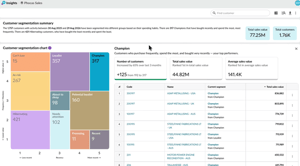
 Smarter Sales Insights powered by AI
The latest updates to Sales Insights bring even more AI into your sales workflows. Your reps get a clear read on every account and their best opportunities ranked automatically, so preparing for a call takes minutes, not hours. Another step in making selling easier.
-
AI customer summaries [early access]
Get a concise overview or a more detailed narrative with context. Open the account before your call and the summary's already there: what's changed, what's dropped off, what's growing, pulled straight from the account's own history. -
AI ranked opportunities [early access]
Overdue reorders to revive, cross-sells to pitch, the product to lead with, each one ranked by what it's actually worth.
 CRM
CRM A simpler, faster CRM designed for reps on the move
Every update to Phocas CRM comes back to one goal: making it easier for your reps to use. This release brings AI-powered activity capture, visual pipelines and a refreshed interface, less admin, less friction, more time to sell.
-
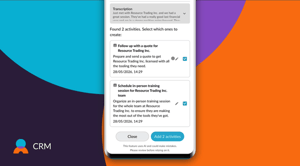
Capture sales activity with AI voice to task
Turn spoken updates into tasks and notes quickly, helping reps keep customer records current while on the move. -
Manage opportunities with visual pipelines
See deals by stage, understand what’s moving and quickly spot where follow-up is needed. -
Work faster in CRM
A refreshed interface, improved filtering and search, better record handling and stronger mobile usability make everyday CRM work easier. -
Turn insight into action
CRM is increasingly connected with the rest of Phocas, making it easier to move from customer insight to assigned activity and follow-up.
 Sales Insights
 More connected workflows and faster action with Sales Insights
Insights now works more seamlessly with the rest of Phocas, helping you move faster and act on opportunities without breaking your flow. You can take action directly from Insights or dive deeper into your data with connected tools for richer analysis.
What’s new
- Open customer segments in Flex Modes
Jump straight from a segment to Flex Modes, with customers automatically applied as a filter so you can explore their transactions, products, and trends in more detail. - Create CRM tasks directly from Insights
With a CRM license, create tasks in bulk without leaving Insights—so you can quickly act on key customers and keep your sales workflow moving.
 Sales Insights
 Tailored sales insights, powered by more advanced segmentation
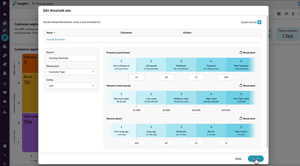
Shape Insights to better reflect how your business works, with more control over segmentation, data inclusion, and how transactions are defined. These enhancements help ensure your insights are cleaner, more relevant, and aligned with your real-world operations.
What’s new
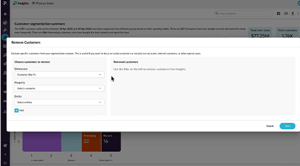
- Remove customers
Exclude specific customers from Insights calculations entirely—so inactive accounts, closed customers, or outliers don’t skew your results. - Define threshold sets
Apply different segmentation thresholds to different customer groups, making your value bands more accurate and meaningful for how your business operates. - Define your transaction property
Choose which field defines a transaction—such as Invoice Number or Order Number—so frequency and related metrics align with how your business tracks activity.
