Create a project

Learn how to create a Rebates project from the Rebates Project page and set it up for adding rules. You choose the source database, enable receivable or payable rules, select the stream and the value and quantity measures for your brackets, set calculation and display precision, and optionally assign a group.
Supporting documentation

Related video tutorials

 Rebates
Post calculation results
Learn how posting calculation results saves them to your rebates database and locks them for that calculation period so later runs don't overwrite them. Posting doesn't issue a payment or claim or write data to your ERP system. You can post from the rule or in bulk from the Results tab, and a rule with posted results can't be edited or deleted.
 Rebates
Analyze rebates using dashboards
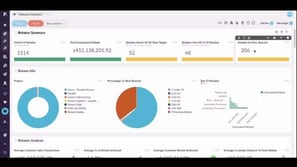
Learn how to use dashboards that draw on the rebates analysis and near miss analysis databases to track total rebates, brackets achieved, top performing rebates, and where surplus is likely to surface. You also learn how to see margin impact before and after rebates, and how to share a dashboard with a customer using a viewer license.
 Rebates
Analyze near-miss rebates
Learn how to analyze the near miss analysis database in Rebates, which acts like a return on investment gauge for rebate cycles. You add measures such as bracket achieved, distance to the next bracket, and likely rebate, then slice the data by supplier or customer to see how much more you need to spend to earn the next payout.
 Rebates
Analyze rebate performance
Learn how to use the rebates analysis and near miss analysis databases to see where rebate amounts are paid out by rule, bracket, or agreement, and which customers or suppliers they're based on. You also learn how to visualize the results, add them to a dashboard, and, as a customization, blend rebates into your sales data to compare value and profit before and after rebates.
